
Market overview
Compare the broad market with /index for top coins by market cap, /hm heatmaps, /best and /worst gainers, /macro for macro assets, and /pm for prediction markets.
Rick answers "how is the market doing" three ways: /index lists the top
coins by market cap, /hm draws a heatmap, and /best and /worst rank the
biggest movers. All three read CoinGecko data. /index and /hm accept the
same category filters; /best and /worst take only a timeframe and a set
size. /macro adds a macro overview across BTC, gold, silver, and equities,
and /pm finds prediction markets.
Commands
| Platform | Command | Description |
|---|---|---|
| /index | Top 10 coins by market cap, with pages, categories, and timeframes on Telegram. |
| /macro | Macro overview across BTC, gold, silver, and equities. |
| /hm | Crypto heatmap scaled by market cap. Also /hmap. |
| /hmc | Heatmap of popular crypto categories. |
| /hms | Heatmap of the largest US stocks. |
| /best | Top 10 gainers out of the top 300, 500, 1000, or all coins. |
| /worst | Top 10 losers from the same sets. |
| /pm <query> | Search active Polymarket prediction markets. |
Index: top coins by market cap
/index gives a quick overview of the top 10 coins by market cap. Total
market capitalisation, Bitcoin dominance (BTC.D), and the Fear and Greed
Index (FnG) are shown in the title by default. Every row links to the coin
on CoinGecko.
Telegram accepts extra parameters. The default timeframe is 24h.
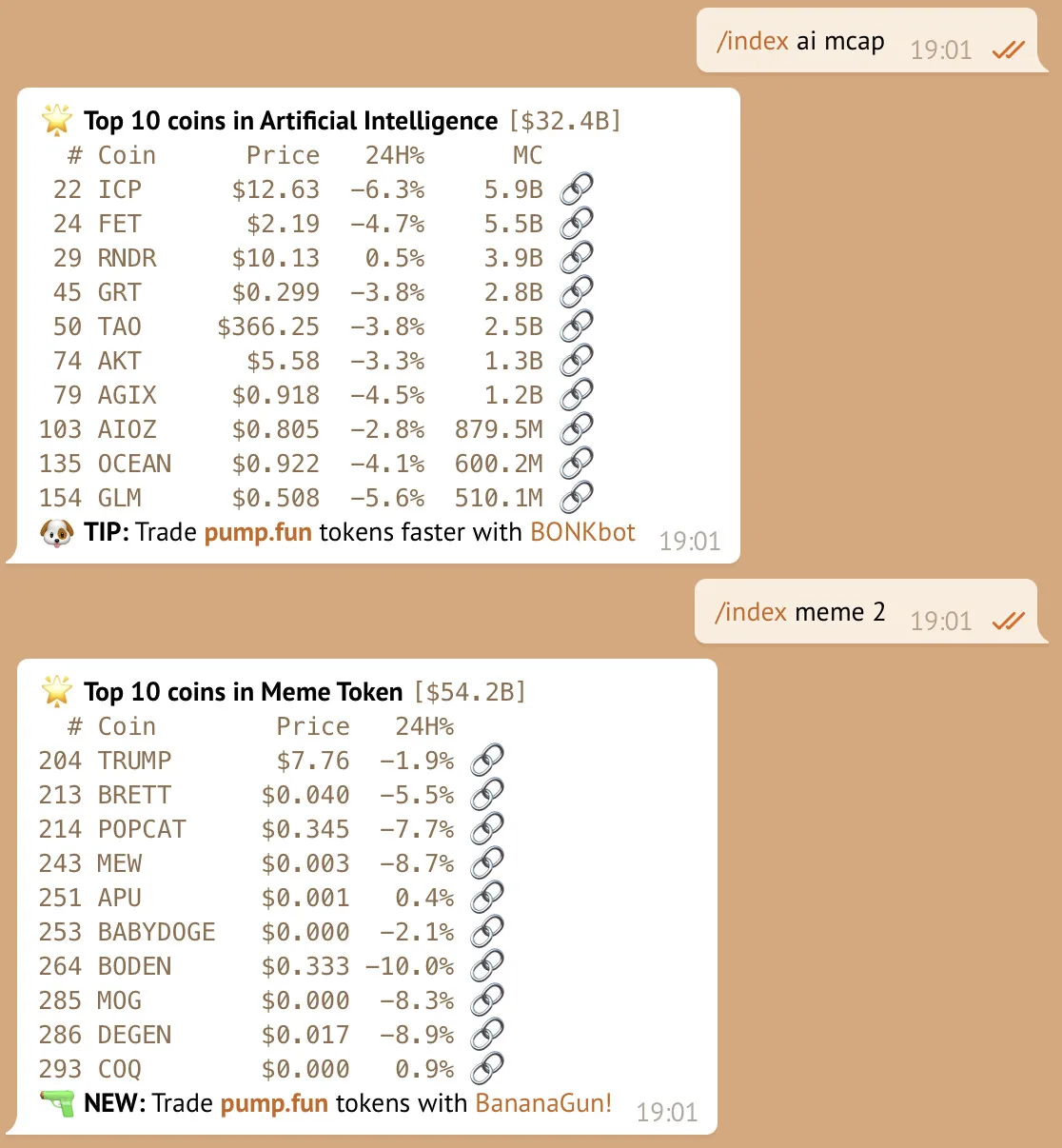
/index- the top 10 coins./index 2- the next page, coins 11 to 20. Any page number works./index mcap- add a market cap column (MC) to the response./index base- the top 10 memecoins on Base. See category filters for every keyword./index 7d- show 7d change instead of 24h. Accepts1h,24h,7d,14d,30d,200d, and1y./index bestor/index worst- sort the top 250 coins of the current set by 24h change, then show the first 10.
All parameters can be combined, in any order. /index l1 2 mcap works just as
well as /index 2 mcap l1.
With a category filter, the title shows the category's total market cap
instead of the global figures. best and worst always sort by 24h change,
even when another timeframe is displayed.
Category filters
Category keywords narrow /index and /hm to one CoinGecko category. Type
the keyword as a parameter, for example /index ai mcap or /hm 25 rwa.
Any word that is not a keyword is passed to CoinGecko as a category id, so
/index solana-ecosystem also works when the id exists.
ai- Artificial Intelligenceagents- AI Agentsaimeme- AI Memesbase,basememe,basememes,bmeme,bm,b- Base Meme Coinsbsc,bnb- Four.meme ecosystem (BNB Chain memes)cex- Centralized Exchanges (CEX)country- Country-themed meme coinsdefi- Decentralized Finance (DeFi)depin- DePINdex- Decentralized Exchanges (DEX)dog,dogs- Dog-themed coinsdpi- DeFi Pulse Index (DPI)elon- Elon Musk inspired coinsfantom,ftm- Fantom ecosystemgamefi,gaming- GameFil0,layer0- Layer 0 (L0)l1,layer1- Layer 1l2,layer2- Layer 2l3,layer3- Layer 3meme,memes,m- Meme Tokennft- NFTp2e,play2earn- Play-to-Earnparody,p- Parody Meme Coinsperps- Decentralized Perpetualsprivacy,priv,privacyfi- Privacy Coinsrwa- Real World Assets (RWA)social,soc,socfi- SocialFisolana- Solana ecosystemsolmeme,solmemes,smeme,sm,sol,s- Solana Meme Coinsstables,stable,sc- Stablecoinstonmeme,tonmemes,tmeme,tm,ton,t- Ton Meme Coinstot,terminal- Terminal of Truthstron,tronmeme,trx- Tron memesusa- Made in USAwlf- World Liberty Financial portfolio
Macro overview
/macro shows a macro overview across BTC, gold, silver, and equities.
/macro- macro overview across BTC, gold, silver, and equities.
Heatmaps
Heatmaps are Telegram only. Discord has no heatmap command: use /index or
/best and /worst there.
/hm (also /hmap) creates a crypto heatmap, a visual overview of market
trends. Every box is scaled by market cap, so it shows how big a share each
asset has within the set. Colors indicate the change in value, and more
vibrant colors mean bigger changes. It is useful for quickly spotting price
movements and telling hot and cold assets apart.
/hm- heatmap of the top coins by market cap over 24h./hmc- heatmap overview of popular crypto categories./hms- heatmap of the largest US stocks.
The default count is 25 coins. You can specify any value between 10 and
250, any category filter known from /index, a
timeframe, and a sort. Parameters can be combined in any order.
/hm 30d vol- heatmap of the top 25 by 30d volume./hm 25 ai- heatmap by market cap for the top 25 AI coins./hm best sol 7d- Solana memes sorted by 7d gain./hm worst 10 rwa- worst performing RWA tokens from the top 10./hmc 20- the 20 biggest categories.
Sorts are vol (order by volume), best, and worst. Valid timeframes are
1h, 24h, 7d, 1w, 14d, 2w, 30d, 1m, 200d, and 1y.
/hms takes a count and a sort, for example /hms 50 vol. It always shows
the current session's move and ignores timeframes and category filters.
On market cap based heatmaps, the dominance shown on the two largest tiles
(DOM) is calculated from the tokens in the grid only. For total BTC
dominance, run /index.
Best and worst gainers
/best and /worst show the best and worst performing tokens. This is also
possible with /index and heatmaps, but these commands can include far more
tokens: the top 300, 500, 1000, or all coins CoinGecko tracks. Each reply
lists the top 10 with market cap rank, price, and change.
/best- top 10 gainers out of the top 300 over 24h./best 500- gainers out of the top 500./worst 7d- the worst losers out of the top 300 over 7 days./best all 1h- every coin CoinGecko ranks, including the coin ranked #7953, over the last hour.
Timeframes are 1h, 24h (default), 7d, 14d, 30d, 60d, and 1y.
Set sizes are 300 (default), 500, 1000, or all. Both can be combined
in any order.
Prediction markets
Prediction market lookups are Telegram only.
/pm <query>- search active Polymarket markets, for example/pm bitcoin.
When someone shares a Polymarket, Axiom prediction, or Future.news event link, Rick replies with the market's odds and buttons to open it on Polymarket, Future.news, or Axiom.
How is this guide?