
Get started on Discord
Learn how to setup Rick on Discord
Add Rick on Discord, set the role colour and the permissions Rick needs, then check that Rick responds. Use the links below to add the official bot.
Add Rick on Discord
Add Rick from the Discord App Directory. Read the steps below carefully, or you will have trouble configuring Rick.
Set the role colour
For Rick to work, his highest-ranking role needs the custom colour
#B0F646. Without this dot . commands won't work.
- Best practice - change the colour of Rick's default
Rickrole to the required colour. - Alternative - create a new role with the required colour, assign it to Rick, and drag it above the default Rick role.
- Complex role hierarchies - if you are experienced with permission structures, make a cosmetic role without any permissions and keep it as the highest-ranking role assigned to Rick. This is easier when you already have a complex role configured for other bots.

Grant channel permissions
Rick needs some permissions in the channels where you want it to work.
Never give third-party bots Administrator rights, including Rick.
- View Channel
- Send Messages
- Read Message History
- Manage Messages, to clean up commands and rate-limit notices
- Embed Links and Attach Files
- Add Reactions
- Use External Emojis
- Create Public Threads and Send Messages in Threads, optional
- Member roles that should run slash
/commandsneed Use Application Commands
If your channels are private, give the Rick role access to each channel: right-click the channel, edit the channel permissions, add the Rick role, and grant the permissions above. If you want Rick in multiple channels, sync the channel permissions with the parent category so you only change the category permissions.
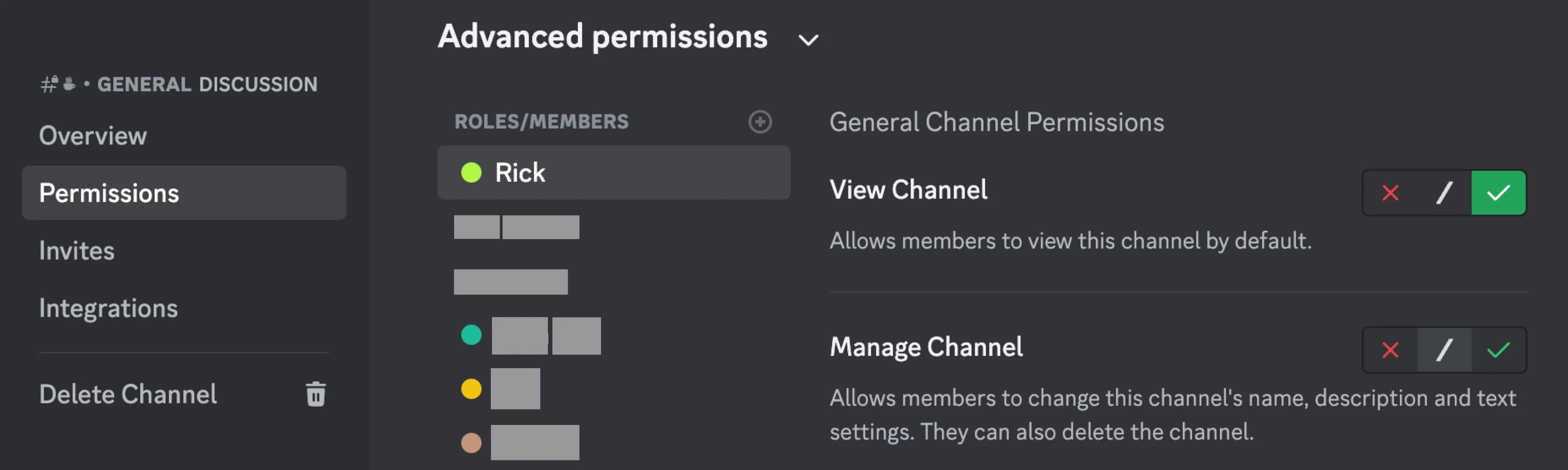
To disable Rick in a channel, remove View Channel from that channel. This also stops tracking the tokens your members check there.
Check that Rick responds
Type .help in a channel where Rick has the permissions above. Rick replies
with a link to these docs and a short command list. Then post a contract or
run .x <token> for a first scan. For everyday habits after setup, see
Tips & shortcuts.
Rick is not responding on Discord
Until the role colour and permissions are set, only slash commands are available.
- Role colour - is the role colour set to
#B0F646, and is that coloured role the highest role Rick has? - Permissions - does Rick have all required permissions in the channels
you use it in? If Rick does not respond to
.help, it cannot see the channel messages or is not allowed to send messages there. - Ping the bot - if you think Rick is down, use
.wubbato ping the bot, or/zap, which also shows which shard your server lives on. See Is Rick down? and Status.
Did you change roles, role hierarchy, or channel permissions? These are common reasons for Rick to stop working.
Confirm the official bot on Introduction.
How is this guide?