
Flexcards
Generate a shareable performance card for a scanned token with /flex, and give a group its own artwork with /fleximg and /flexfont.
A flexcard is an image that shows a token, the FDV at which it was scanned,
how long ago, who scanned it, the gain since, and the current FDV. /flex
generates one for any token on DexScreener, and admins can replace the
default artwork with their own.
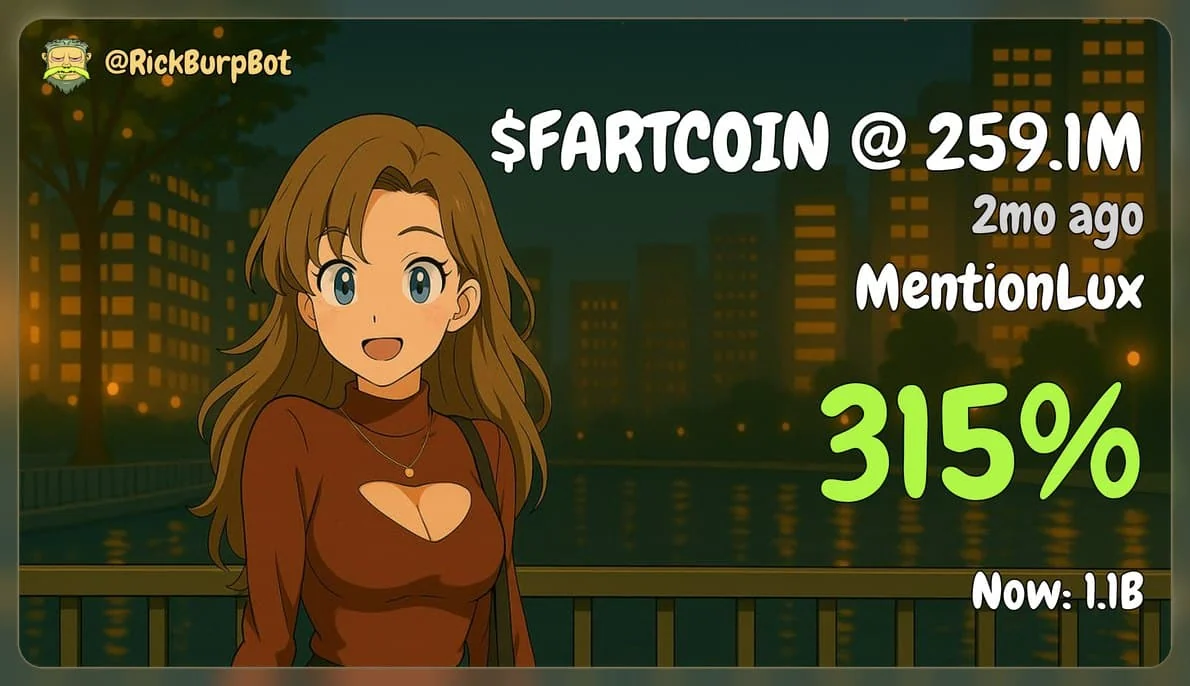
Flexcards are available in all Telegram supergroups and all Discord servers.
Commands
| Platform | Command | Description |
|---|---|---|
| /flex <contract> | Generate a flexcard for a token. Also /pnl on Telegram. |
| /flex last | A flexcard for the latest scan in the chat. |
| /flex <contract> anon | Show the group clantag instead of the username. The anon option on Discord. |
| /fleximg | Set, show, or turn off the custom background. Admins only. |
| /flexfont | Fix the text colour of custom cards to dark or light. Admins only. |
Generate a flexcard
/flex <contract>- a flexcard for that token./pnlis an alias./flexin reply to a token scan - a flexcard for the token in that scan./flex last- a flexcard for the latest scan in the group./flex <contract> anon- show the group's clantag instead of your username.
You can also click the 💪 emoji wherever it appears, on token scans and on
the ATH leaderboard lines, to
generate a flexcard for that token in one tap.
Flexcards can be generated for any token available on DexScreener, and each member can generate one every few seconds.
Set a custom background
Personalise your group. Admins can upload their own artwork, and every flexcard generated in the chat then uses it. Changes can take a short while to become visible.
- Post an image in the chat, 1920x1080 recommended. For the best quality, send it uncompressed: on most clients, untick Compress the image before sending. This is set per image and varies per client.
- Reply to that image with
/fleximg. Rick confirms withCustom flexcard image updated!.
/fleximgin reply to an image or image file - set or replace the background./fleximgwithout a reply - show the current custom image./fleximg off- disable the custom flexcard and return to the default design.
Only group admins can run these, and only inside the group. Rick crops the image to 16:9 around its centre and resizes it to 1920x1080.
Choose a font
A custom card uses one font, and its colour can be fixed so the text stays readable on your artwork.
/flexfont dark- black text./flexfont light- white text.
Admins only.
Image guidance
- Images should be 1920x1080. Other sizes are cropped to that ratio around the centre.
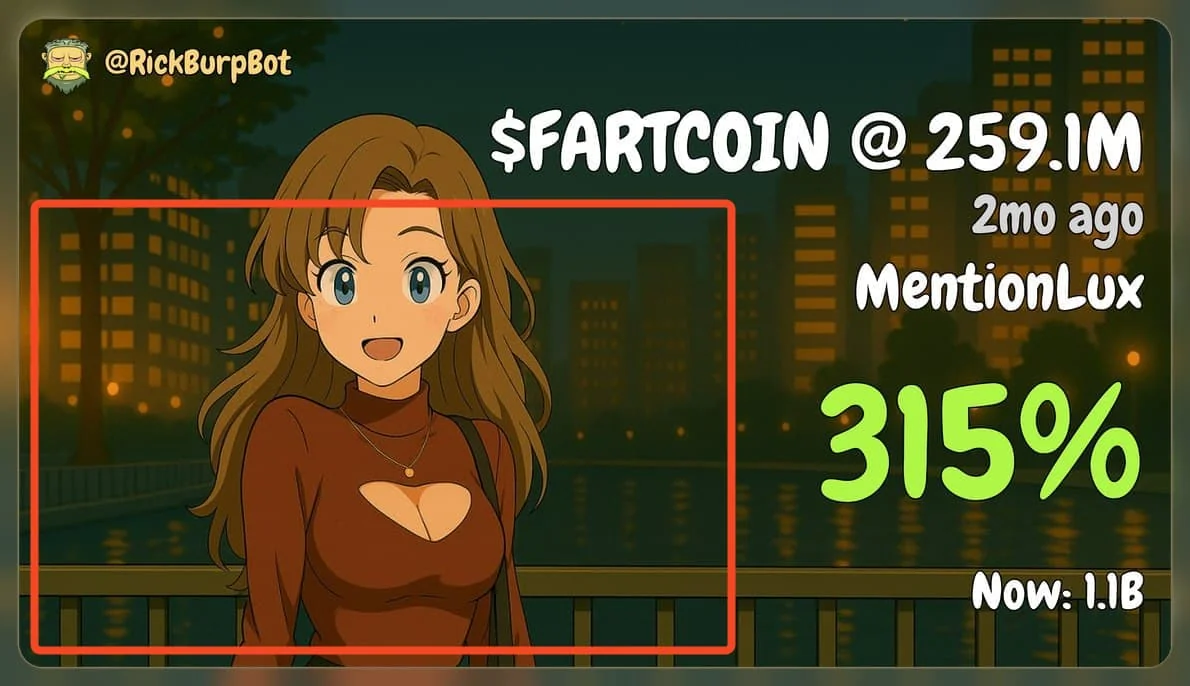
- Use the reference image below to find the safe space. For optimal results, place the main artwork within or around the red box. The right side of the card is where the ticker, FDV, gain, and current FDV are printed.
- Be aware that lengthy tickers may overlap with your artwork if they extend beyond the red box. The final decision on placement is yours.
- You may upload whatever you prefer, and only one font is used when a custom flexcard is active.
How is this guide?