
Slackers
Kira, Rick's companion bot, tracks member activity in a Telegram group so admins can find and remove inactive members with /slackers.
Kira (@KiraBurpBot) keeps an eye on inactive members, or slackers, in a
Telegram group. Once it is an admin, it records every member's last message,
/stats shows the group's activity, and /slackers 7d lists everyone who
has been quiet for a week and offers to remove them. Kira is free to use for
all Rick users.
Kira is available on Telegram only. Add Kira to your group. Discord server admins can use Discord's built-in member-management tools instead.
Commands
| Command | Description |
|---|---|
| /start | Show the welcome message again. |
| /status | Check the requirements and whether monitoring is active. |
| /stats | Tracked members, total messages, and a few random members. Also /info. |
| /stats top | The 10 most active members. /stats bot for the 10 least active. |
| /slackers <days>d [limit] | List members inactive for that many days and offer to remove them. Admins only. |
| /burpback | Report anything weird to the team. |
Add Kira
- Invite
@KiraBurpBotto your group directly. Rick must be a member of the same group, otherwise Kira does not work. - Kira sends a welcome message when it joins. If you do not see it, run
/start. - Make Kira an admin with permission to delete messages and ban users.
- Run
/statusand make sure every requirement shows a green check. Kira only operates while all of them are met, and it can take up to 3 minutes for permission changes to be detected.
Tracking is not retroactive
Members are only tracked from the moment Kira is an admin with the required permissions. Messages sent before that are unknown to Kira, and a member who never writes after that point counts as inactive since Kira first saw them.
If anything weird is happening, report it with the /burpback command.
Check status and stats
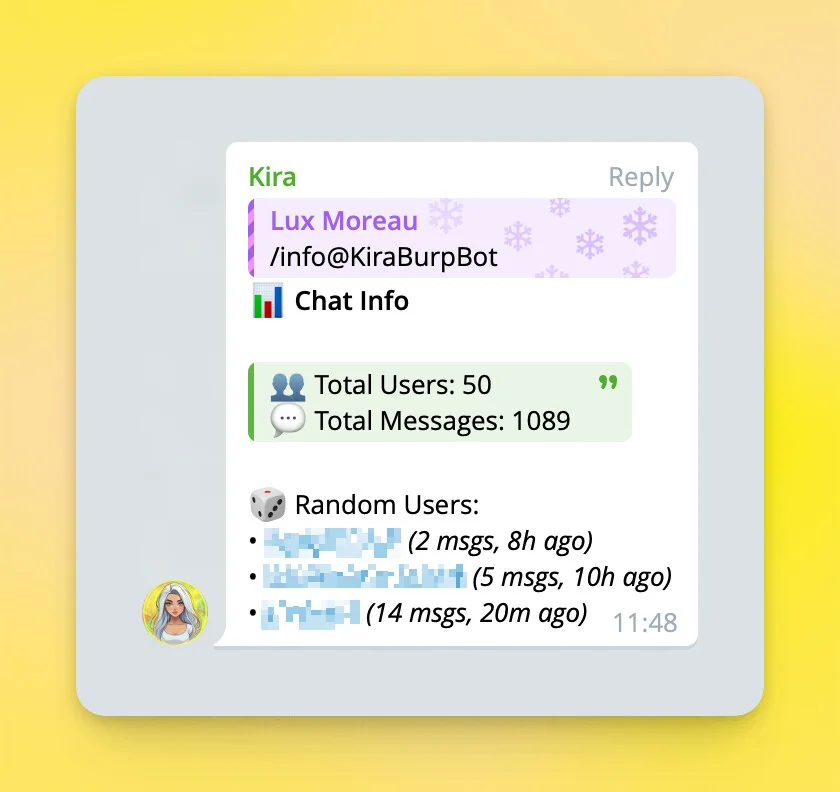
/status- the requirement checklist: Rick is in the chat, Kira is admin, Kira can delete messages, Kira can ban users. When all pass it saysMonitoring is active./statsor/info- the number of tracked members, the total messages they sent, and three random members with their message count and last activity. Run it after setup to confirm tracking works./stats top- the 10 most active members./stats bot- the 10 least active members.
Find inactive members
Run /slackers <timeframe in days>, for example /slackers 7d, to find
members who have not sent a message for that long. You must be a group
admin, and the shortest allowed period is 3 days.
- Kira replies with the list of inactive members, longest inactive first, each with their days of inactivity, message count, and a link to their last message, under two buttons: Kick Inactives and Cancel.
- Press Kick Inactives. Kira asks you to wait a few seconds if you press it immediately, then asks for a final confirmation with Yes or Cancel. The admin pressing it needs the permission to ban members.
- Press Yes. Kira removes the listed members one by one and finishes with a summary of how many were kicked, purged from its list, skipped as admins, or failed.
A list expires after 3 minutes. If you confirm later, Kira asks you to generate a new list.
Safety limits
- Admins are never removed, even if they appear inactive. Users with a title are admins without additional permissions, so they are protected too.
- At most 50 members are removed per run by default, as a safety
measure against mass purges. Add a second argument for a different limit,
for example
/slackers 60d 250; the ceiling is 1000. Kira repeats the limit in effect in its confirmation prompt. - Removed members are kicked, not banned. They can rejoin with an invite link.
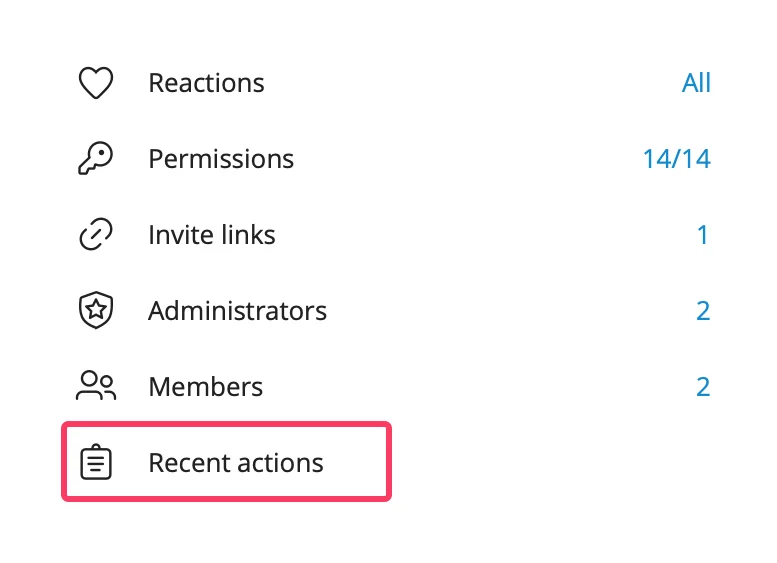
- You can review everything Kira did under Manage Group, then Recent actions.
Members who already left
Kira learns that a member left from Telegram's service message, and Telegram
stops sending those in larger groups. The source states the limit as 50
members. Beyond that point, Kira can keep members in its database who
already left or were removed, so /stats counts may be higher than the real
member count. Running /slackers cleans this up: members who are already
gone are purged from Kira's list instead of being kicked, and they are
reported as purged in the summary.
How is this guide?