
Rick AI
Chat with Rick, ask live questions, set custom prompts, and generate images.
Rick AI is the conversational side of Rick: chat when addressed, look up live information, steer tone with a custom prompt, and generate images on Telegram.
AI replies use AI credits. Token scans and most non-AI commands do not.
Rick AI can be wrong or incomplete. Treat answers as assistance, not financial advice, and verify important claims independently.
Commands
| Platform | Command | Description |
|---|---|---|
| @rick | Core chat in the current conversation, with recent context. |
| /ask | Direct answer with web search when current info is needed. |
| /deep | Longer, more thorough answer than /ask. |
| /rick | Answers about Rick features and docs. |
| /prompt | Show, set, or reset the chat custom AI prompt. |
| /img | Generate an image from a text prompt (10 credits). |
Balance and top-up commands (/mybalance, /balance, /transfer, and
/topup) are on Telegram commands and
Premium.
Chat with Rick
Core AI is any Rick reply that is not a dedicated command. Each Core AI reply costs 1 credit.
- Mention
@RickBurpBot, or writeRickwith a capital R. - Rick does not respond to plain replies to its own messages. To give Rick context, reply to a message while mentioning the bot: it then knows which message you are replying to.
- In a DM with Rick, every non-command message is treated as chat. No mention is required.
- Reply to a message while addressing Rick to give that message as context.
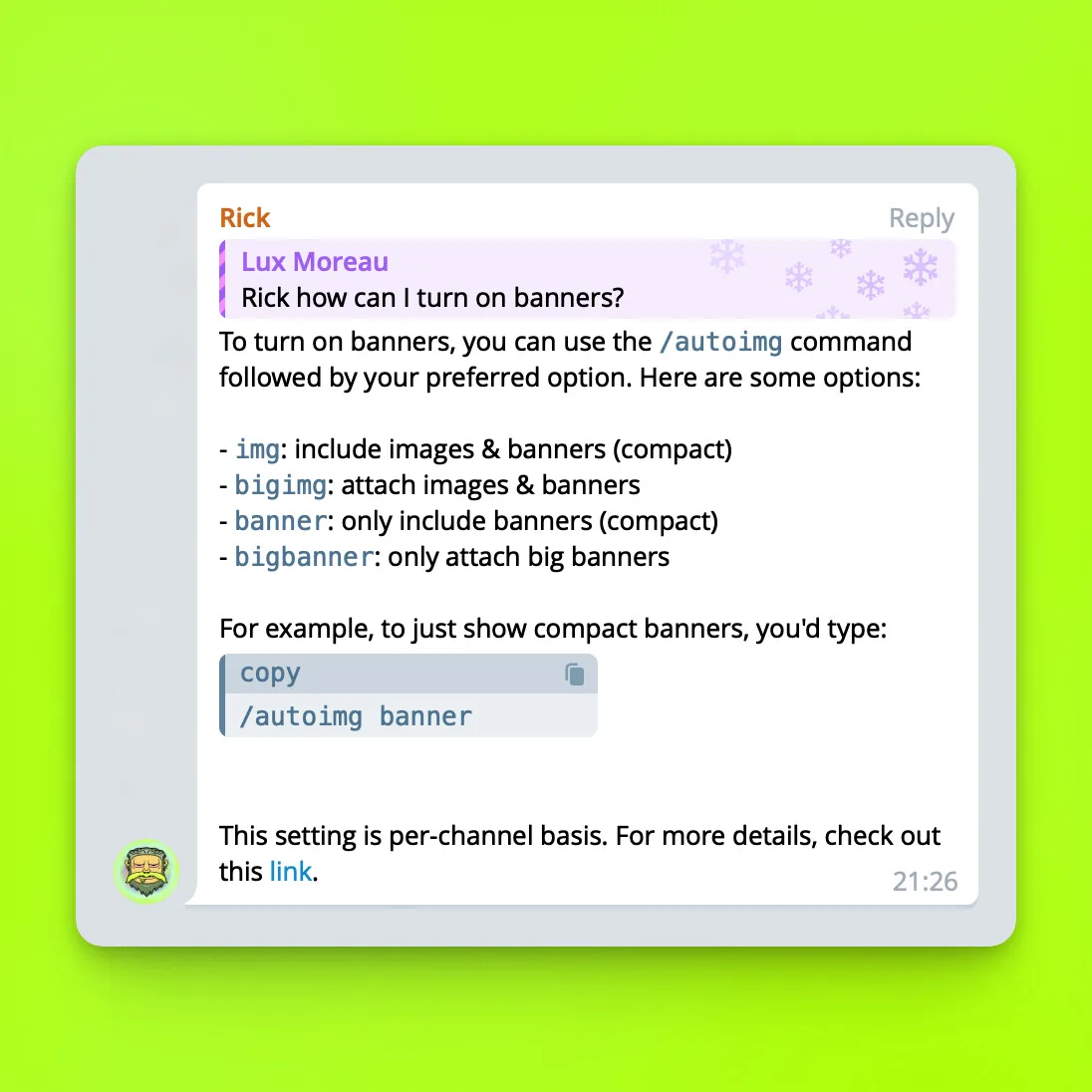
Core AI lives in the chat and is aware of the recent context in every
interaction. Rick can also search Talk.Markets or browse most websites when
needed. He decides when to use those tools, but you can ask him explicitly,
for example Rick, summarize the latest updates or
Rick how can I turn on banners?. For commands built for web browsing, see
Live answers.
Core AI cannot be turned off. Rick listens to Rick with a capital R or to
mentions by default, and limiting it to mentions only would make the
interaction far less fluid. If a chat and its members run out of credits and
do not top up, AI replies stop until credits are available again. A member who
still has personal credits can keep using the AI. Rick cleans up
out-of-balance messages when it can delete messages.
Vision on Telegram
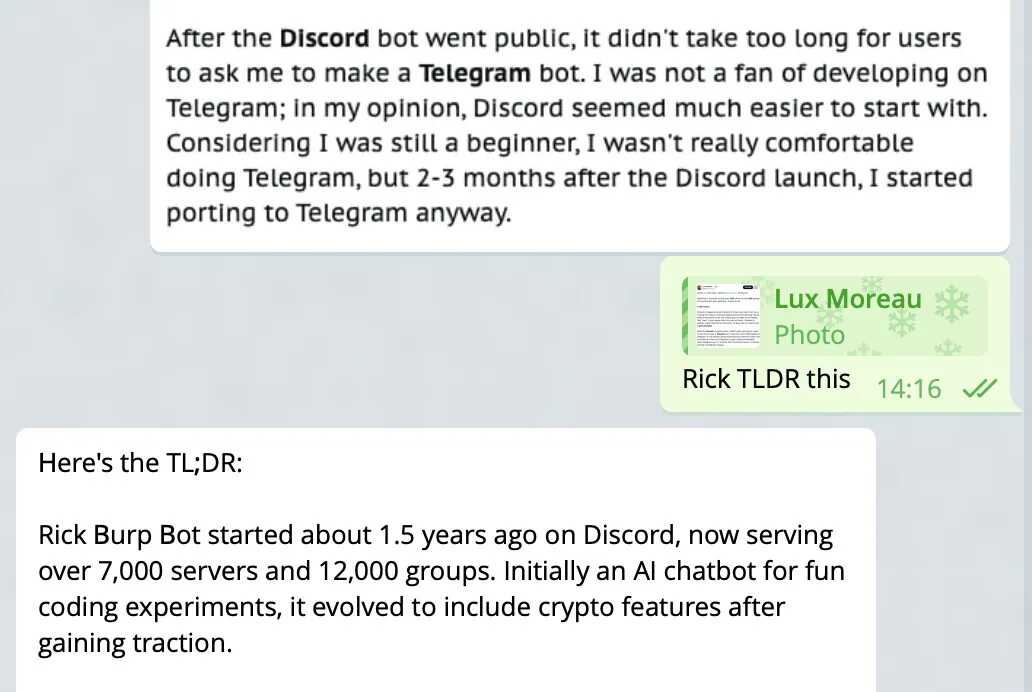
Reply to an image while mentioning Rick so Rick can see that image. Tell Rick what to do with it in the same message: explain the image, or use it for image-to-text tasks such as summarizing or translating a screenshot.
Rick never sees an image unless you reply to it directly. Images are not stored and are used only for that reply, so later prompts cannot refer to them. Vision works with Core AI only, not with other AI commands.
Reply tools on Telegram
Quick one-shot wrappers for common tasks. Reply to a message, or paste the
content after the command, and Rick handles it. Each costs 1 credit, same
as Core AI. They work best as a reply to the message you want Rick to act
on, and extra steering can follow the command, for example
/eli5 respond in bullet points.
/eli5- explain like I'm 5./fact- fact-check the referenced claim./define- decode jargon, acronyms, and technical terms./explain- what it means and why it matters./counter- the strongest counter-argument to the take./simplify- rewrite the content in plain words./tldr- summarize the message or link. Details on Summaries and research./vibes- a quick vibe check./rate- rate the content 1 to 10 with short reasoning./jab- roast or mock the author.
Live answers
/ask searches the web for current topics. It is built for direct Q&A, not
long back-and-forth. Reply to a message with /ask to include that message as
context.
For current topics, include a timeframe or an @handle when relevant. Ask
for an official site or the documentation when you want Rick to use those
sources.
/ask <question>- realtime answer with web access when needed, for example/ask when is the next FOMC meeting?./deep <question>- a longer, more thorough answer./rick <question>- questions about Rick itself.
For better current answers, name a timeframe or an @handle. Ask for an
official site or the documentation when those sources matter.
/ask, /deep, and /rick read less chat history than Core AI. Reply to
or quote a message while using them to feed that message as extra context.
For questions about Rick's own features, prefer asking Rick directly or
using /rick on Telegram instead of /ask.
Custom instructions
Want a nicer Rick, or a highly academic one? Admins can set a chat-wide
prompt with extra instructions. The prompt is stored per chat or DM on
Telegram and per server on Discord, and applies to every @RickBurpBot or
Rick mention.
Be clear in your prompts. The prompt does not overwrite Rick, so if you want
a very different behaviour or a very specific tone, be direct and specific.
Single keywords or vague wording confuse Rick and the prompt is likely to be
ignored. Start with You are ..., the preferred way to instruct any LLM.
The custom prompt affects @RickBurpBot or Rick mentions only. Other AI
commands such as /dubx and /ask have their own optimised prompts and are
not affected.
/prompt- show the current prompt./prompt <instructions>- set the prompt (max 256 characters)./prompt reset- restore default Rick.
Only admins can change the prompt. Links and jailbreak-style text are rejected.
Changing the prompt mid-conversation may not show immediately, because earlier replies still sit in recent context and may not match the new instructions.
Copy-paste prompts
Ready-made prompts to start from:
Use formal grammar. Keep responses short, be playful, but helpful. No slang, slurs or abbreviations.The prompt above makes Rick talk with less slang and more formal language.
You are very friendly and helpful in this chat. Avoid roasting chat participants.You are a very helpful assistant. Your level of knowledge is academic. No jokes. Use long-form answers if needed to elaborate on a topic.The original version of this prompt also said "ignore earlier instructions". Rick for Telegram now rejects prompts with that wording as a prompt injection attempt, so it is left out here. Discord accepts it.
You are a very nice version of Rick. You love all chat members, some a bit more than others.Image generation
/img <prompt>- generate an image from the prompt./imgin reply to a text message - use that message as the prompt.
Each successful generation costs 10 AI credits. Generations are rate-limited per chat. Short prompts leave more randomness; longer prompts steer the result more tightly. Safety filters similar to ChatGPT are enabled across all models. The models in use are replaced with newer or enhanced versions over time.
The credit system exists mainly to prevent misuse and automation of AI
commands. All users and chats are gifted free AI credits at random, so
normal usage stays free. If you need more, use /topup. See
Premium.
How is this guide?