
Summaries and research
Summarize links, long messages, X threads and profiles, and the recent chat, get automatic recaps, and scan a webpage for copies.
Rick summarizes almost anything. Use /tldr for a link, a video, or a long
message, /ts for an X profile report, and /dub for the recent chat. Premium
groups can turn on automatic recaps with /autotldr, /web checks
whether a webpage has been copied, and /git scores a GitHub repository.
All of these are AI commands and spend AI credits, except automatic recaps and repository scans, which are free. The credit table on Premium is the reference for costs.
Commands
| Platform | Command | Description |
|---|---|---|
| /tldr | Summarize a link, or the message you reply to. .s on Discord. |
| /vid | Summarize a YouTube video. .vid on Discord. |
| /ts | AI report on an X profile and its recent posts. .ts on Discord. |
| /dub | Summarize the recent chat and pin it. .d on Discord. |
| /dubs | The same summary without pinning. |
| /dubx | Summary from the alternative model, with optional instructions. .dx on Discord. |
| /autotldr | Automatic recaps when a Premium group goes quiet. Admins only. |
| /web | Find similar or copied webpages. .web on Discord. |
| /git <github url> | Trust score for a GitHub repository. |
Summarize links and messages
Supported sources:
- X threads and profiles
- Medium articles
- Substack articles
- GitHub repositories
- YouTube videos
- Forum topics
- Short to medium-sized PDFs
/tldr https://...- summarize an article or website./tldrin reply to any message with a link - summarize that link./tldrin reply to any long message without a link - summarize the message itself. Forwarded messages work too.
Each summary costs 5 AI credits.
If Rick is in your channel's comment section, /tldr works as a reply to a
channel post for quick summaries there.
X profile and thread summaries
/tldr <thread url>- summarize an X thread./ts <handle or profile url>- a profile report for any X profile with recent posts.- Click the ✨ emoji on any X repost by Rick to get a thread or profile summary without typing a command.
A profile report costs 25 AI credits, or 10 when Rick still has a recent report for that profile cached.
Profile reports are the same summary you get from the ✨ emoji on X Profile Insights.
YouTube videos
/tldr https://...-/tldrsupports YouTube videos directly./vid https://...- the older command still works and does the same.
Chat summaries
Get a quick summary of the recent messages in the chat. The input is a fixed number of recent messages, not everything since you were last online, so the output stays useful.
/dub- summarize the recent chat and pin the summary./dubs- the same summary, sent without pinning./dubx- the permanent experimental version on an alternative model. Both stay available, so pick whichever you prefer./dubx <instruction>- add your own instructions, for example to focus the summary on one person or topic.
Examples:
/dubx let's focus on @mentionlux/dubx just Ethereum stuff, please/dubx you should roast all chat participants
Rick must be an admin in the group, and there must be at least 50 recent messages. Summaries do not work in a DM. Each summary costs 5 AI credits, as described in Premium and credits.
Context size
The summary covers the last 200 messages. Premium chats have double the limit, 400 messages.
Automatic chat recaps
Premium groups on Telegram can receive automated recaps of the recent discussion. A recap only fires when the chat has been idle, so it never interrupts a conversation, and only when there is enough new discussion to recap. Catch up fast after stepping away, see the takeaways instead of the noise, and keep busy chats readable for everyone.
Automatic recaps are Telegram only and require Rick Premium. They do not spend AI credits.
/autotldr on- turn recaps on with the default idle time of 15 minutes./autotldr off- turn recaps off./autotldr <minutes>- turn recaps on and set the idle time, from 5 to 60 minutes, for example/autotldr 30.
Admins only. The recap is posted as 💭 tldr: followed by one or two short
lines.
Webpage similarity
Find out whether a website has been copied or shares content with other sites. Rick compares the page with all known URLs and returns the top five most similar results, how long ago each was first detected, a short AI report, and the hyperlinks found on the page. It works well for spotting copied or stolen GitHub repositories.
/web https://...- scan a webpage.
The Telegram report also includes WHOIS and DNS details.
Not all domains are supported. Websites like X are excluded from the scanner, because they add no value to the dataset.
The tool helps you find similar websites. Always verify the results. The AI summary and the flags help when the older site is already offline.
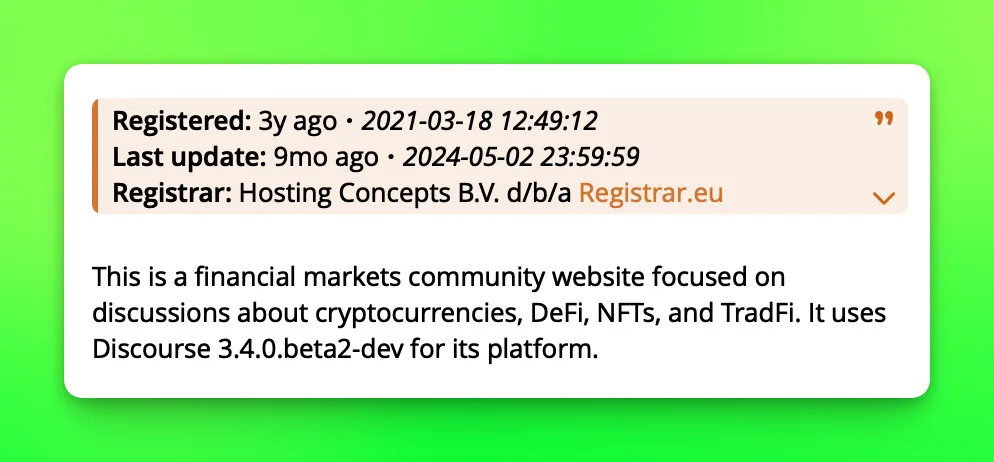
WHOIS and DNS
WHOIS and DNS details are Telegram only.
The top of the report shows WHOIS information about the domain registration. Expand that section for more detail, including DNS records.
NS- name server record, showing which servers are in charge of the domain and handle DNS requests. -A- maps the domain to an IPv4 address so the site can be reached by name.AAAArecords do the same for IPv6 and are left out for simplicity. -MX- mail exchange record, naming the servers that receive email for the domain. -TXT- text record that stores arbitrary text, often used for verification such as proving domain ownership.
Scoring and flags
Rick shows the five websites with the highest scores from its algorithm. A high score does not by itself mean the content is copied. Longer pages tend to score higher. The dataset keeps evolving and the scores adapt with it, so the more you use the command, the easier the scores are to read.
Rick may raise flags to help you decide:
- 🚨 - high likelihood of copied text.
- 🧬 - possibly a similar template or website builder.
- 🤖 - AI match, high likelihood of very similar or exact content.
When one or more flags are raised, expect a significantly higher score. The scoring algorithm and the flags are experimental and are refined as the dataset grows.
Is there a simple way to tell if a website is copied? Almost exact copies usually show up with two or more flags. Without flags a full copy is unlikely, but parts of the page may still be copied, which raises the score.
Reading the results
- All results have a similar score - probably not a copy.
- The top result scores significantly higher than the rest - very likely a copy, often with flags raised.
- Every result scores slightly higher than usual - the page is not an exact copy but has small differences from a very similar page.
GitHub repository scans
Rick replies with a Zauth trust score out of 100, repository metadata, a short TLDR when one is available, and a link to the full report. On Telegram the reply also marks forks and their parent repository, and lists short Watchouts and Signals, such as few commits, a single author, backdated commits, or active development.
/git <github url>- scan a repository, for example/git https://github.com/owner/repo.
A GitHub repository link posted on its own triggers the scan too, with no command needed.
The score is a research signal, not a safety guarantee. A high score does not make a repository trustworthy, and a low one does not make it malicious. Read the details and judge for yourself.
How is this guide?