
Token discovery
Find the oldest pump.fun tokens, a deployer's history, recent chat scans, and same-ticker PVP and OG matches.
These commands find tokens instead of scanning one you already have: the oldest or newest pump.fun deploys for a name, everything a deployer launched, what the chat scanned recently, and tokens that share a ticker.
Commands
| Platform | Command | Description |
|---|---|---|
| /pfs <query> [new] [exact] [mcap] | Oldest or newest pump.fun deploys for a name. /pfsearch on Discord. |
| /dev <wallet or token> | Deploy history of a deployer. |
| /last [count] | The most recent scans in this chat. |
| /hot [count] | Recently scanned tokens with repeated views. |
| /pvp <symbol or address> | Same-ticker tokens launched around the same time. |
| /old <symbol or address> [suffixes] | Oldest tokens sharing a ticker across chains. /new for newest first. |
pump.fun age search
The easiest way to find the oldest (or newest) pump.fun token with a name.
Results show the 💊 link, $SYMBOL, market cap, age, and a ✅ when the token
has bonded.
/pfs <query>- the oldest pump.fun deploys, broad search, up to 10 results./pfs <query> new- the newest deploys./pfs <query> exact- only exact ticker matches, oldest first./pfs <query> exact mcap- sorted by market cap.
For /pf and .pf, see
Pricebot usage.
Deployer history
/dev is available on Telegram.
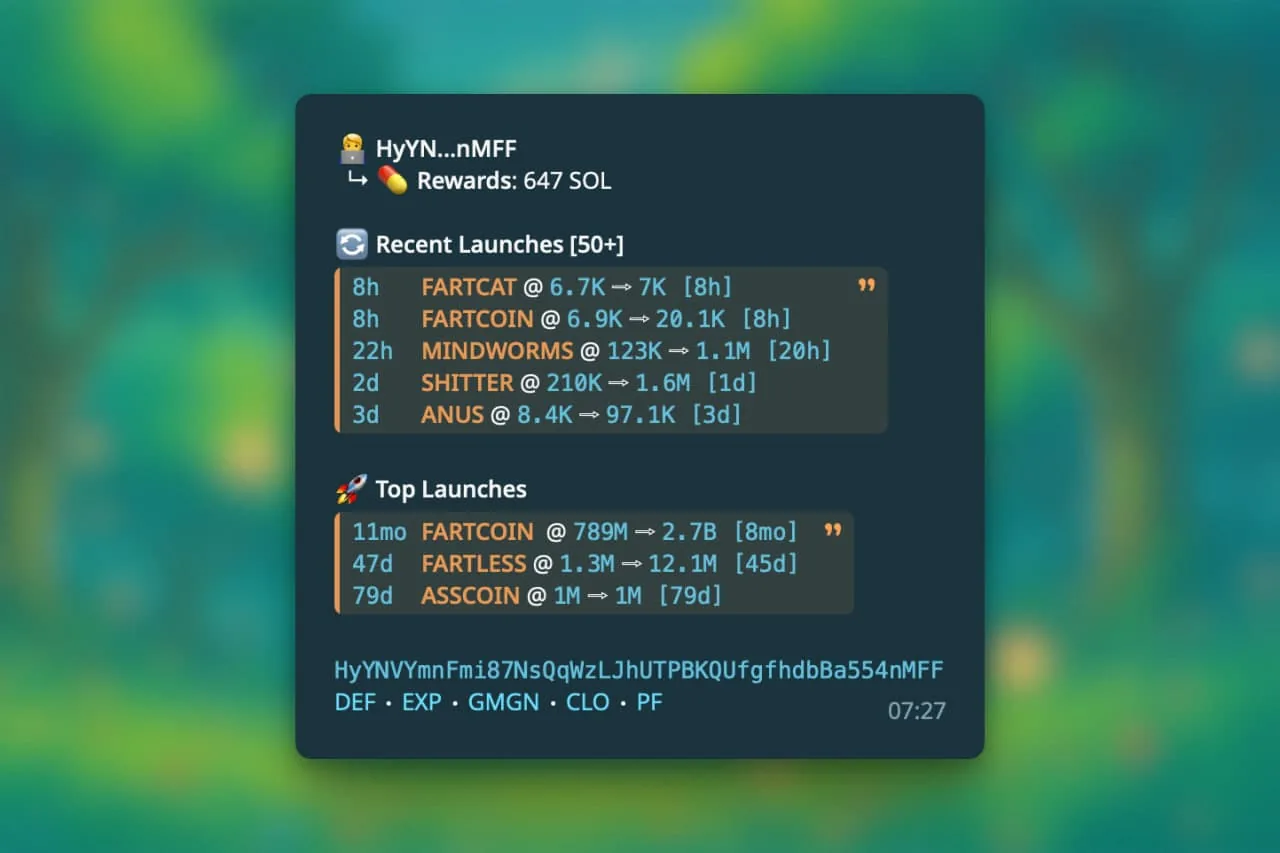
/dev shows the deploy history of any deployer: the deploy rate, pump.fun
creator rewards when available, recent launches sorted by age, top launches
sorted by current FDV, and links to popular tools.
When the deployer has a first funding event on record, the reply also adds the funder, the amount funded, and how long ago it happened. The row is omitted when there is nothing to show.
- Click the DEV hyperlink on a pre-bond scan. Force the pre-bond view
with
/pf <contract>. /dev <wallet or token address>- the same from a wallet or a token.
Recent chat scans
/last and /hot give a fast snapshot of the tokens scanned in a group,
each with its current FDV and the change since it was first scanned.
/last- the 15 most recently scanned tokens./hot- the most recently checked tokens with at least five recorded views in this chat. It can include older tokens that dropped out of/last./last <count>or/hot <count>- a different count, up to 30./last @handleor/last me- scans by one member.
Both commands work in groups only.
PVP matches
PVP Finder shows $TICKER matches that fit various criteria, so you
quickly see the relevant tokens of interest: tokens with the same ticker that
launched within a few hours of each other.
- PVP matches are shown automatically on scans of tokens younger than 24 hours, up to three, scoped to the token's own chain.
- For older tokens, or for more results, run the command. It returns up to ten matches across all supported chains.
/pvp <symbol or address>- PVP matches for a token./pvpin reply to a token scan - matches for the token in that scan.
Results are sorted by FDV. Each line reads AGE ⋅ FDV ⇨ ATH ⋅ 1H: VOL, for
example 20m ⋅ 25K ⇨ 52K ⋅ 1H: 192K, with a launchpad emoji when available.
Click the age for the token info.
There may be more ticker matches. Rick only shows results that are relevant enough to display.
Use /burpback <feedback> in reply to a token scan to report missing tokens,
tokens that should not be there, or other thoughts.
OG finder
/old and /new are available on Telegram.
Find the oldest tokens sharing a ticker across chains, great for spotting the original versus copycats. This is a less filtered variant of PVP matches. Results are ranked by token creation time, oldest on top.
/old <symbol>- the oldest tokens matching that symbol or name./old <address>- resolves the address to its ticker, then lists the OGs sharing it./oldin reply to a message containing a token address - picks up the address automatically./new <symbol or address>- the same, newest creation on top.
Chain these suffixes at the end of the query, in any order:
vol- only tokens with 24 hour volume of $10,000 or more.<network>- scope to one chain:eth,sol,base,bsc(orbnb).fuzzy- allow partial ticker matches. A single-word query is exact by default; a multi-word query is fuzzy by default.exactforces exact.mc- sort the output by FDV.fdvandmcapdo the same.top- at most three results per chain, so one network cannot drown out the rest.
/old DOGE eth fuzzy vol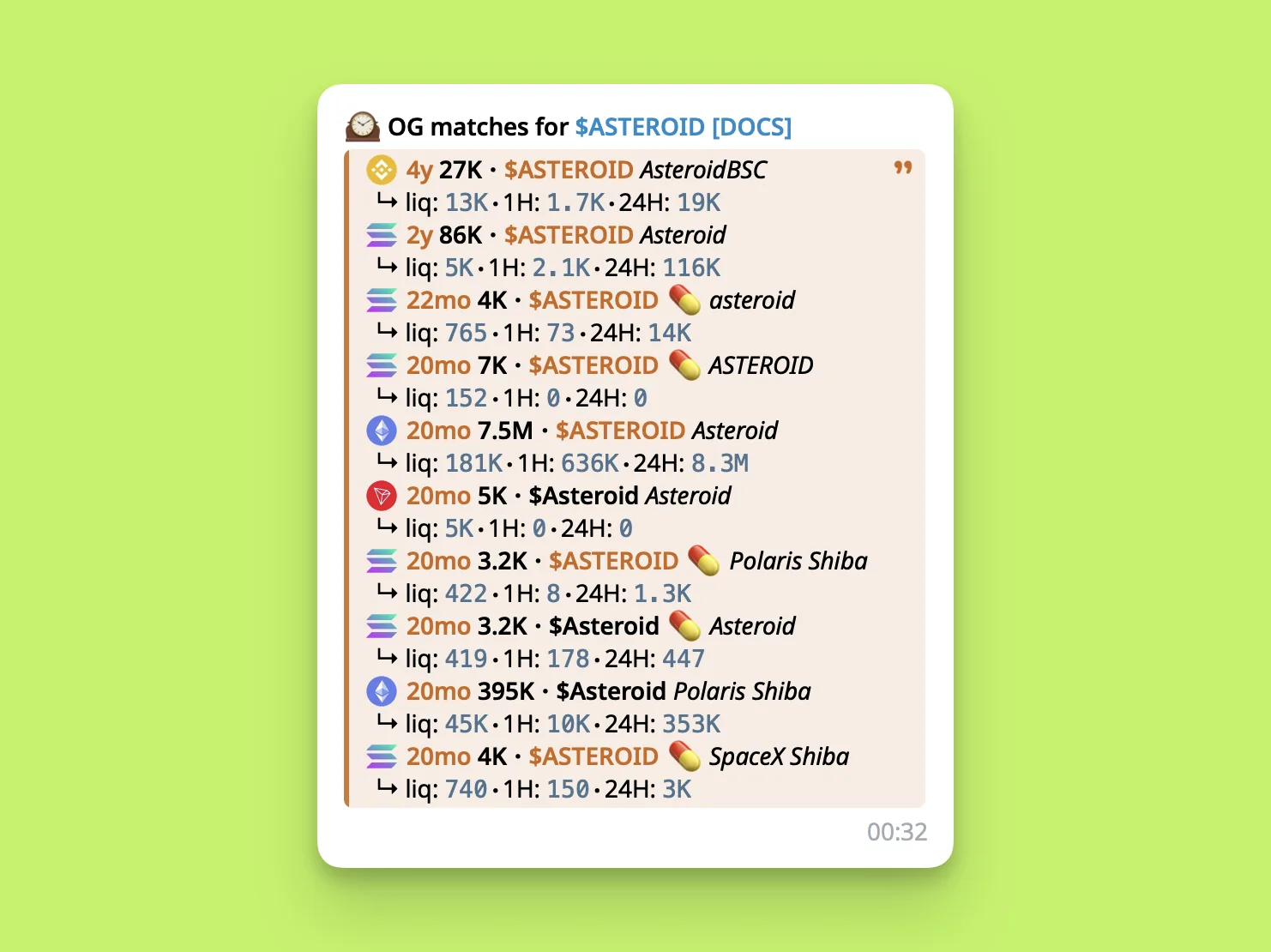
Notes:
- Each result shows the token age, FDV, liquidity, 1 hour volume, 24 hour volume, and the launchpad emoji (Pump, Bonk, and others).
- Up to 10 results per reply. Tap the age to open the token in Rick.
Holder analysis
For Solana tokens up to three days old, Rick may show holder-analysis figures when the scan has the relevant data.
- 📦 Bundler-held: wallets with 4 or more transactions in the same slot.
- 👻 Insider-held: wallets that received tokens via the deployer.
- 🎯 Sniper-held: wallets that bought within the first 4 seconds.
- 🧑💻 Dev-held: the deployer's holding.
In the default full layout, the indicators appear below the holder total. The
📦 there is not clickable. In the alternative full layout, the row is labeled
HA; its 📦 entry opens a TrenchScannerBot analysis when present.
Some launchpad scans can also show a separate 📦 shortcut in the More row.
That is a link to further analysis, not confirmation that Rick found a notable
bundle. Compact /z and reduced chart or widget responses do not show the
holder-analysis row.
How is this guide?