
Top Holders
Read top-200 holder concentration and notable wallets.
Rick reads a token's top 200 holders three ways: /h for recognized and top
wallets, /nh for the wealthiest ones, and /hs for a stats summary. On
Telegram, labels you set for wallets appear in these views. Manage them on
Wallets.
Commands
| Platform | Command | Description |
|---|---|---|
| /h <token> | Known/Top holders: recognized wallets first, then the largest holders by supply. |
| /nh <token> | Notable holders: the same set ranked by wallet net worth. |
| /hs <token> | T200 stats: concentration, dev held, wallet labels, supply origin. |
| /top <token> [period] | Top 10 wallets by realized profit on a token, over a period. |
<token> takes a contract address, and often a token name or symbol.
Send /h, /nh, or /hs as a reply to a token scan to use the token from
that scan, with no argument. Discord has no reply shortcut, so pass the token.
Known/Top holders
/h lists recognized wallets first, then the largest remaining holders by
supply. Public KOL wallets are recognized everywhere. On Telegram, wallets
labeled in that chat are recognized too.
/h <token>- known and top holders./ohis an alias./hin reply to a token scan - the same view for the token in that scan.
The holder list runs to 10 in a group and 15 in a direct message. The 💎 on
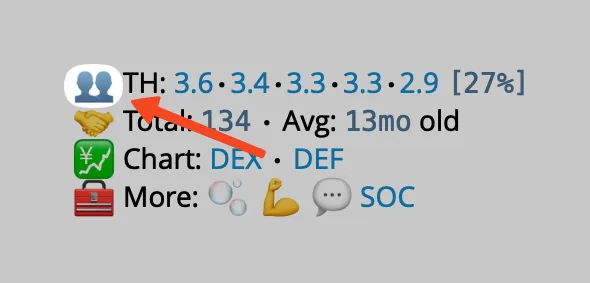
the reply opens notable holders. On a scan, click the
👥 emoji in front of the TH line for the same views.
Wallets shown in italics with a 💎 are public KOL wallets. The 💎 links to their X profile. If you have not labeled them yourself, Rick labels the known KOLs for you. The deployer's wallet carries the 🧑💻 emoji.
Notable holders
/nh ranks the same top-200 set by wallet net worth instead of supply share,
richest wallet on top, and shows each wallet's other major holdings. Only
holders with significant holdings are included, so the list is shorter than
the raw top 200.
/nh <token>- notable holders of a token./nhin reply to a token scan - notable holders for the token in that scan.
Fetching the balances can take a moment.
The icon in front of a holder reflects the wallet's net worth, excluding the scanned token:
- 🐋 - over $1M.
- 🦈 - over $100K.
- 🐟 - over $10K.
- 🦐 - over $1K.
- 🧑💻 - the deployer.
Holder stats
/hs returns a T200 stats for $SYMBOL summary, one metric per line.
/hs <token>- T200 holder stats for a token./hsin reply to a token scan - stats for the token in that scan.
T10/T20- supply held by the biggest 10 / 20 holders, excluding known pool and system accounts.Dev- the deployer's holding.Sold/0%means no dev balance left.
KOL- wallets on Rick's known KOL list.Fresh- first transaction in the last 14 days.Dormant- inactive for 60 days or more.Good- $1k or more 30 day profit, a 50% or better win rate, 10 or more 30 day swaps, and low bot and scammer scores.High PnL- 5 or more swaps and either $10k or more realized profit or a realized profit of 50% or more.High Volume- $100k or more volume over 30 days or over 1 year.
Each label shows the count of matching top-200 wallets, then the combined supply those wallets currently hold. A label with no matches is left out.
Bundled/Insider/Sniped- the wallet count, then↣ X% leftfor the supply those wallets still hold. See Holder analysis.
The buttons on the reply are shortcuts to 🏆 Top traders, 💎 notable holders, and 🤝 known holders.
Top traders
/top ranks the 10 wallets with the best realized profit on a token over a
period. It answers who actually made money on a token, which the holder views
do not show: a wallet can be gone from the holder list and still be the best
trader on it.
/top is available on Telegram. Discord has no top traders command.
/top <token>- top traders over the last 7 days, the default period./top <token> <period>- a different period./top <period> <token>- the same, in either order./topin reply to a message holding a contract address - picks the address up from the reply. Add a period after it if you want one.
Periods map onto four buckets, so several spellings reach the same window:
| Period | Accepted values |
|---|---|
| 1D | 1d, 24h, d, day, t, today |
| 7D (default) | 7d, 1w, w, week |
| 30D | 30d, 1m, m, month |
| 365D | 1y, 365d, y, year |
Each row shows the wallet, its realized profit in USD with the percentage
gain, and a second line with the buy and sell counts and their USD totals.
When a trader still holds part of what they bought, the row adds 🤲 X% left.
The coloured marker beside the profit opens Rick's PnL card for that wallet.
Wallets are named by the same rules the holder views use: a label set in this chat wins, then a known KOL name, then a shortened address. Top traders needs a chain Rick can map to a numeric chain ID, and Rick says so when a chain is not supported yet.
Wallet labels
Name wallets in your chat
Wallet labels appear in Telegram holder views. Set labels, manage lists, and look up wallet stats on Wallets.
How is this guide?