
Wallets
Wallet stats, plus labels you can manage in a Telegram chat.
/w looks up any wallet. In a Telegram chat, you can also give wallets names
that appear in holder lists and wallet lookups. Labels are private to that
chat, including DMs with Rick.
Commands
| Command | Description |
|---|---|
| /w <address or label> [period] | Performance and stats of a wallet. |
| /wl <label> [emoji] | Label a wallet in reply to a wallet scan. |
| /wimport | Import up to 30 labeled wallets per run. |
| /wexport [wipe] | Export labeled wallets as a .txt file. wipe clears them, owner only. |
Wallet stats
/w gives a quick insight into the performance and stats of any wallet. Rick
also responds automatically to any active wallet pasted in a chat or in DMs.
When Rick finds a wallet's first funding, the reply shows the funder, how long ago it happened, and the amount when available.
/w <address or label>- recent performance of a wallet. A label set in this chat works instead of the address./w <address> <period>- a different window:1d,7d(default),30d, or1y.
Copy the wallet address with the 📋 button on the reply.
Label a wallet
Wallet labels are only available in Telegram chats, including DMs with Rick.
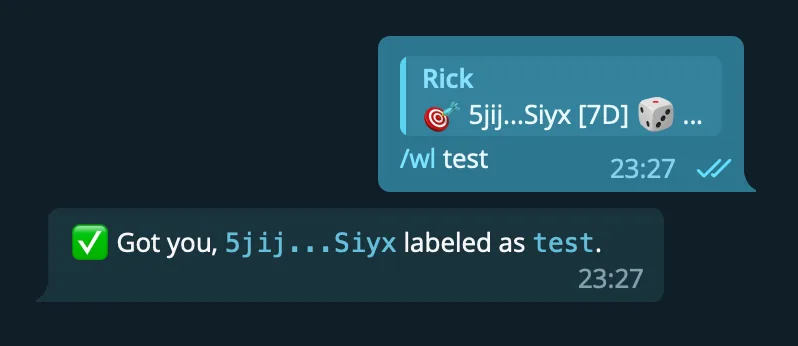
/wl labels wallets that are shared in the chat. Use it in reply to a wallet
response from Rick.
/wl <label> [emoji]- label the wallet in the scan you reply to. The emoji is optional and is only displayed next to the label./wl del- delete the label. Scan the wallet, then reply with it.
Labels may contain letters, numbers, and underscores, 3 to 24 characters. Spaces become underscores. A label is unique per chat, so a label already used for another wallet is rejected. A chat can hold up to 1,000 labeled wallets.
Import and export wallets
/wimport imports a list of wallets with labels. The expected format is
always one wallet,label pair per line:
wallet1,label_1
wallet2,label_2
Two ways to import:
- Send a
.txtor.csvfile in that format and reply to it with/wimport. Files up to 100 KB are accepted. - Send
/wimportfollowed by the lines, one pair per line.
A run imports at most 30 wallets. Rick reports invalid addresses, then skips labels or addresses that already exist in the chat. EVM and Solana addresses are accepted.
/wexport sends the full wallet list of the chat as a .txt file in the same
wallet,label format, sorted by label, with a blank line after every 30
wallets so the file splits neatly into import runs. Any wallet tracker or
platform that reads plain text should accept it.
/wexport wipe exports, then clears every label in the chat. Only the chat
owner can wipe.
Convert Axiom exports
Wallet trackers export in their own formats. Rick's
wallet converter turns an
Axiom tracker export (JSON or CSV) into the
wallet,label format. Click Export on the Axiom tracker page, paste the
contents into the converter, and copy or save the output.
By default the output is split into blocks of 30 wallets, the maximum per
/wimport run, which makes importing larger lists easier. The converter can
also sort the wallets alphabetically.
How is this guide?